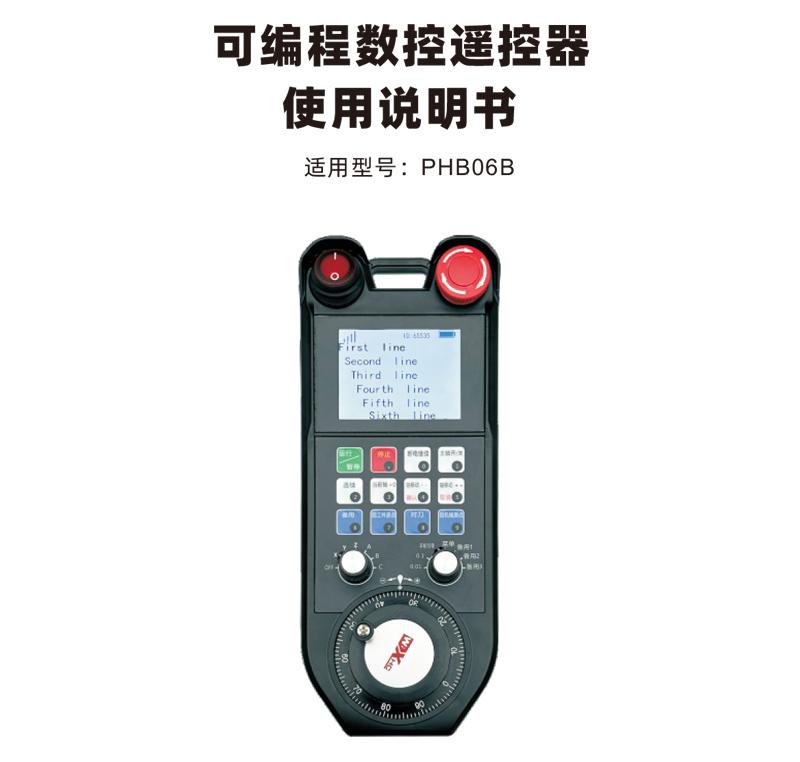
Programmable CNC remote control PHB06B

Programmable CNC remote control PHB06B

Adopt automatic frequency hopping function,Use 32 sets of wireless remote controls at the same time,No effect on each other
Supports 12 custom key programming
Supports 2.8-inch screen,Display content custom programming


  • Stable transmission
  • Accessible distance transmission 80 meters
  • Easy to operate

Description


可编程数控遥控器PHB06B适用于各种数控系统的无线遥控操作支持用户自定义编程开发按键功能,Realize remote control of various functions on the CNC system;支持用户自定义编程开发显示屏内容,Realize dynamic display of system status;Remote control comes with rechargeable battery,Support Type-C interface charging。

1.Using 433MHZ wireless communication technology,Wireless operating distance 80 meters;
2.Adopt automatic frequency hopping function,Use 32 sets of wireless remote controls at the same time,No effect on each other;
3.Supports 12 custom key programming;
4.Supports 2.8-inch screen,Display content custom programming;
5.支持1个6档轴选开关可以自定义编程
6.支持1个7档倍率开关可以自定义编程
7.支持1个电子手轮,100脉冲/圈
8.支持标准Type-C充电;5V-2A充电规格电池规格18650/12580mWh电池

Handheld terminal operating voltage and current 4.0V/51.7mA
Rechargeable battery specifications
18650/12580mWh
Handheld terminal low voltage alarm range <3.2V
Handheld terminal transmit power 15dBm
Receiver receiving sensitivity -100dBm
Wireless communication frequency 433Mhz频段
Button service life 15Thousands of times
Wireless communication distance Barrier-free distance 80 meters
working temperature -25℃<X<55℃
Anti-fall height (meters)
1
receiver port USB2.0
Number of buttons (number)
12
显示屏
2.8
Product weight (g) 548(remote control)
Product size (mm)
237*94*59.6(remote control)

Comment:
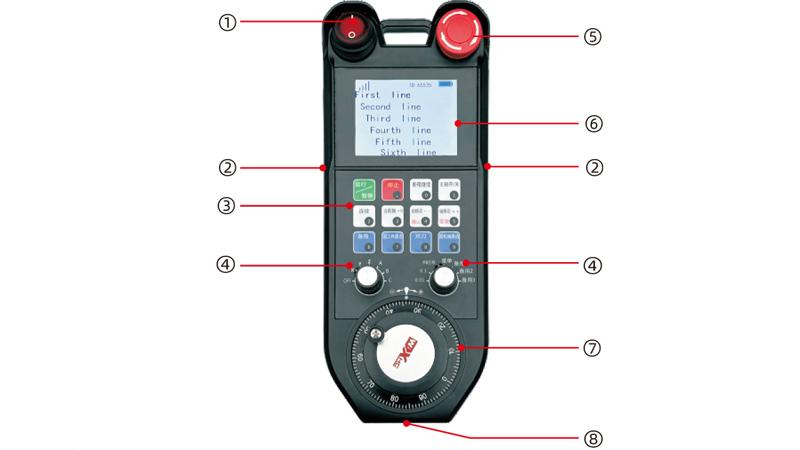
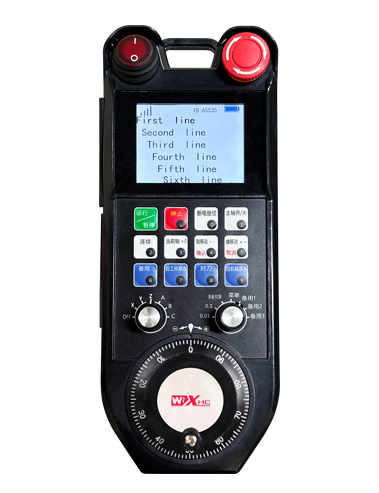
①电源开关
控制手轮开启与关闭;
②两侧使能按键
摇手轮必须按住使能按键
③自定义按键区域
3X4排列的12个按键,User-defined programming;
④轴选,倍率开关

1个6档轴选开关可以自定义编程;1个7档倍率开关可以自定义编程

⑤急停开关
手轮急停开关
⑥显示屏显示区域

可显示当前电量信号以及自定义显示内容

⑦电子手轮
1个电子手轮,100脉冲/圈
⑧充电口
内置充电电池使用Type-C规格充电器充电,Charging voltage 5V,Current 1A-2A;充电时长7小时


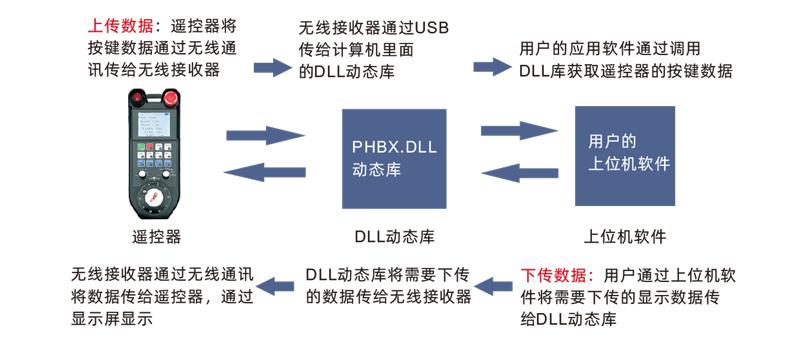
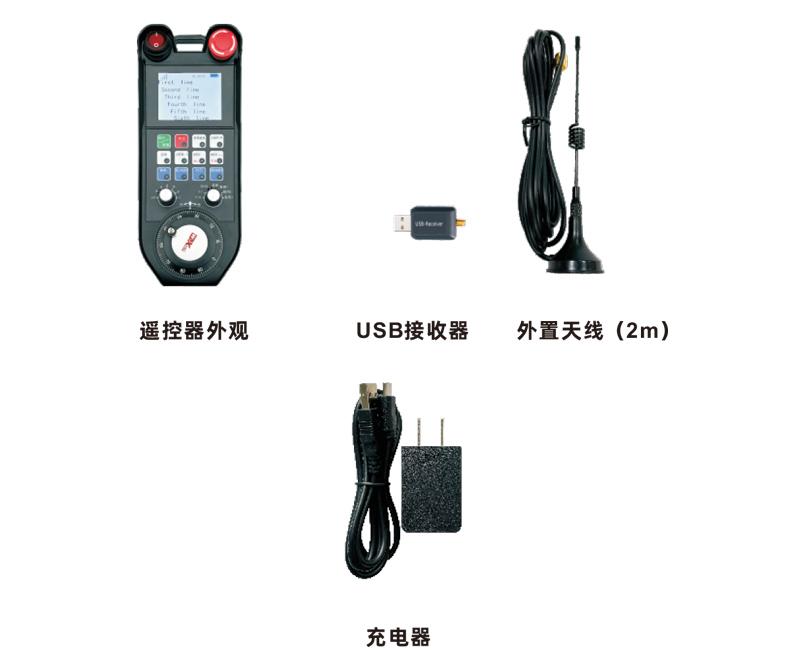
1.Plug the USB receiver into your computer,The computer will automatically recognize and install the USB device driver,无需手动安装
2.Remote control plugged into charger,After the battery is fully charged,打开电源开关,Remote control power on,显示屏显示正常,Indicates successful booting;

3.After booting,Any key operation can be performed。The remote control can support simultaneous operation of two buttons。按下任意按键时遥控器上信号旁会显示黑色方块,Indicates that this button is valid。

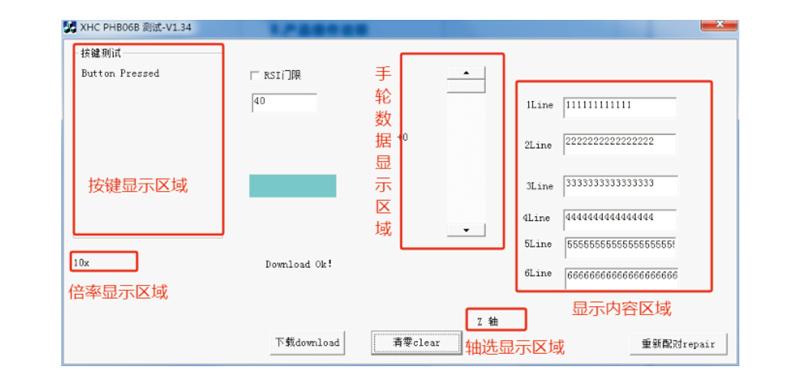
Before product development and use,可以使用我们提供的Demo软件对遥控器进行按键测试和显示屏显示测试也可以把Demo作为日后编程开发的参考例程
Before using Demo software,Please plug the USB receiver into the computer first,Make sure the remote control has sufficient power,打开电源开关开机,and then use;
When any button on the remote control is pressed,测试软件Demo会显示对应的键值松开后键值显示消失,Indicates that button upload is normal。

Remark:Detailed DLL dynamic link library application,请参考《PHB06B DLL库-windows应用说明》

Failure situation Possible reasons Troubleshooting
打开开机键
显示屏不亮
Unable to turn on and off
1.遥控器未安装电池
或电池方向安装错误
2.Battery is low
3.Remote control failure
1.Check the battery installation status of the remote control
2.Charge the remote control
3.Contact the manufacturer and return to the factory for maintenance
Plug in the USB receiver,
电脑提示无法识别
和安装驱动失败
1.电脑USB接口深度不合
,Causes poor contact at the socket
2.Receiver USB failure
3.Computer USB is not compatible
1.Laptop using USB splitter;
Desktop computer plugged into the back of the host;
2.使用Demo软件检测USB
接收器是否正常工作
3.Replace a computer for comparison testing
Remote control buttons,
Software is unresponsive
1.USB receiver not plugged in
2.The remote control is out of power
3.The remote control and receiver IDs do not match
4.Wireless signal interruption
5.Remote control failure
1.Plug the USB receiver into the computer
2.Remote control charging
3.检查遥控器和接收器的标
,Confirm that the ID numbers are consistent
4.使用Demo软件进行配对
5.Contact the manufacturer and return to the factory for maintenance

1.Please keep it at normal temperature and pressure,Use in dry environment,Extend service life;
2.Do not use sharp objects to touch the key area,Extend key life;
3.Please keep the key area clean,Reduce key wear;
4.Avoid damage to the remote control caused by squeezing and falling;
5.Not used for a long time,Please remove the battery,And store the remote control and batteries in a clean and safe place;

6.Pay attention to moisture-proofing when storing and transporting。

1.Please read the instructions carefully before use,Operation by non-professionals is prohibited;
2.Please use the original charger or a charger produced by a regular manufacturer with the same specifications.;
3.Please charge in time,Avoid incorrect operations due to unresponsiveness of the remote control due to insufficient battery power.;
4.Need repair,Please contact the manufacturer,If the damage is caused by self-repair;The manufacturer will not provide warranty。

Welcome to Xinshen Technology

Chip Synthesis Technology is a research and development company、Production、High-tech enterprise integrating sales,Focus on wireless data transmission and motion control research,Dedicated to industrial remote controls、Wireless electronic handwheel、CNC remote control、Motion control card、Integrated CNC systems and other fields。We thank all sectors of society for their strong support and selfless care for Chip Synthetic Technology.,Thank you to the employees for their hard work。

Official Twitter Latest News

Information interaction

Sign up for the latest news and updates。don’t worry,We won't spam!

    Go to Top