Description
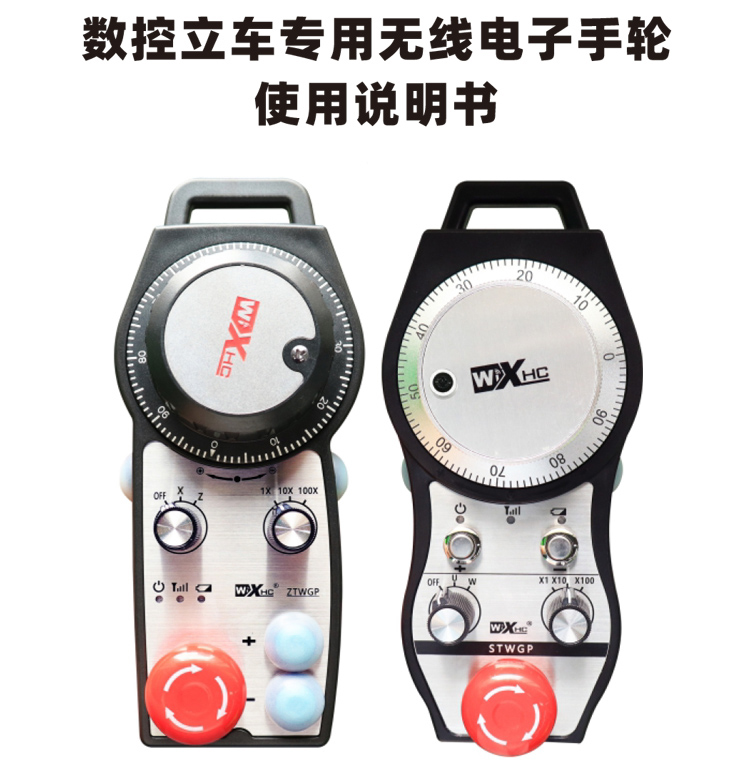

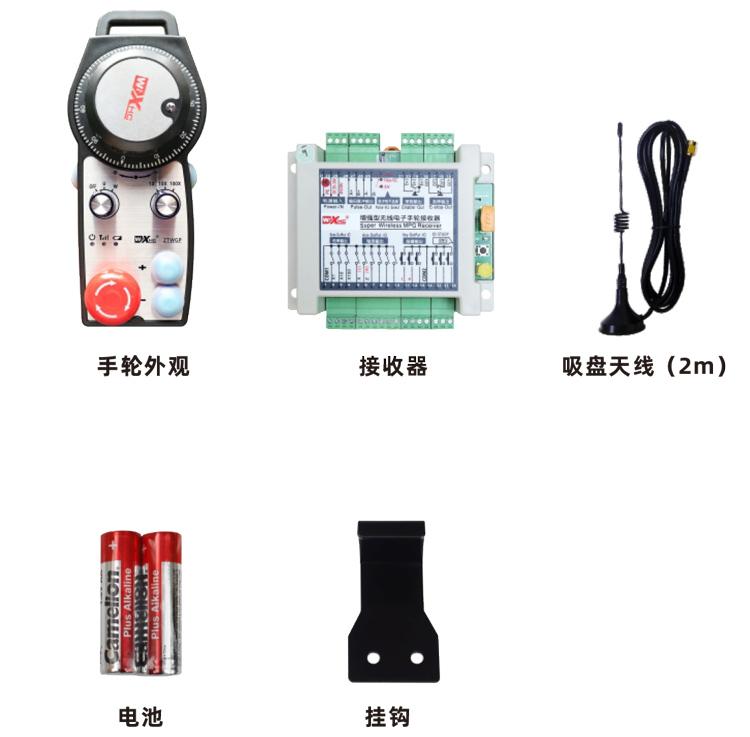
The special wireless electronic handwheel for CNC vertical lathes is used for manual guidance of CNC vertical machine tools.、position、Tool setting and other operations。This product uses wireless transmission technology,Eliminates traditional spring wire connections,Reduce equipment failures caused by cables,Eliminate cable dragging,Disadvantages such as sticking to oil stains,More convenient to operate。Widely applicable to CNC vertical lathes、Single column vertical lathe、Double column vertical lathe and other vertical lathes。And can be adapted to various CNC systems on the market,Such as Siemens、mitsubishi、Fanuc、Xindai and other CNC system brands。

1.Using 433MHZ wireless communication technology,Wireless operating distance 40 meters。
2.Adopt automatic frequency hopping function,Use 32 sets of wireless remote controls at the same time,No effect on each other。
3.Support emergency stop button,Switching quantity IO signal output。
4.Supports 2 custom buttons,Switching quantity IO signal output。
5.Support 2-axis control。
6.Supports 3 levels of magnification control。
7.Support enable button function,Can output switching IO signals,You can also control axis selection、magnification and encoder。
8.Support axis selection and magnification to modify the encoding type through software。
9.Support pulse encoder,Specification: 100 pulses/turn。

| Handheld terminal operating voltage and current |
3 V/14 mA |
| Battery specifications |
2AA alkaline batteries |
| Handheld terminal low voltage alarm range |
<2.3V
|
| Receiver supply voltage |
DC5V-24V/1A |
| Receiver emergency stop output load range |
AC125V-1A/DC30V-2A |
| Receiver enable output load range |
AC125V-1A/DC30V-2A |
| Receiver custom button output load range |
DC24V/50mA |
| Receiver axis selection output load range |
DC24V/50mA |
| Receiver multiplier output load range |
DC24V/50mA |
| Handheld terminal transmit power |
15dBm
|
| Receiver receiving sensitivity |
-100dBm |
| Wireless communication frequency |
433MHz frequency band
|
| Wireless communication distance |
Accessible distance 40 meters
|
| working temperature |
-25℃<X<55℃ |
| Anti-fall height |
Comply with national testing standards |
| Number of custom buttons |
(2 pieces) |

Right column hand wheel(Right tool holder hand wheel)
model:ZTWGP03-2AA-2-05-R
Left column hand wheel(Left tool rest handwheel)
model:ZTWGP03-2AA-2-05-L
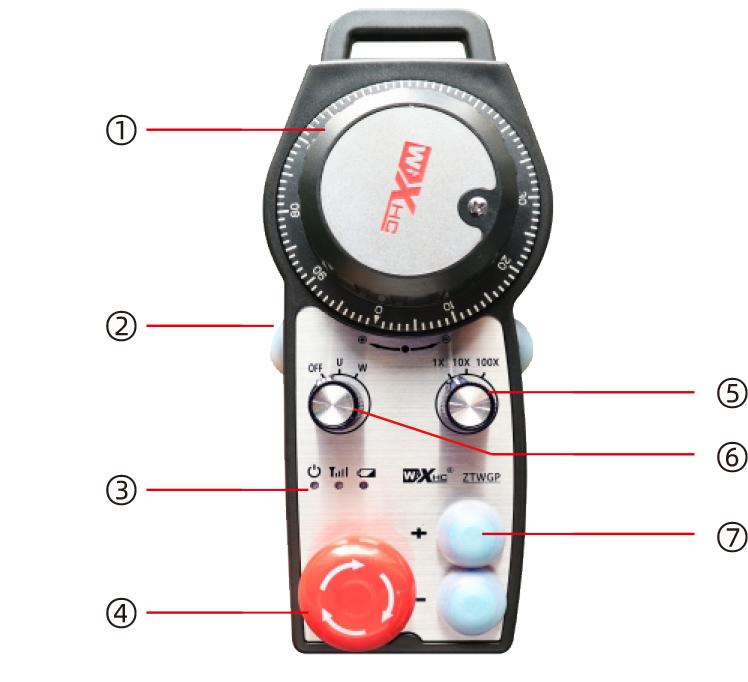
Right column hand wheel(Right tool holder hand wheel)
model:STWGP03-2AA-2-05-R
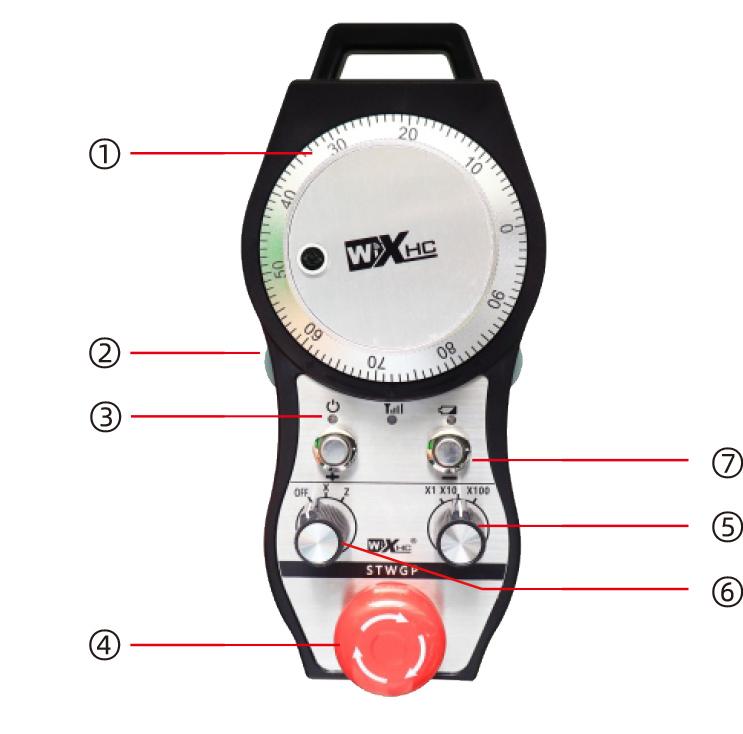
Left column hand wheel(Left tool rest handwheel)
model:STWGP03-2AA-2-05-L
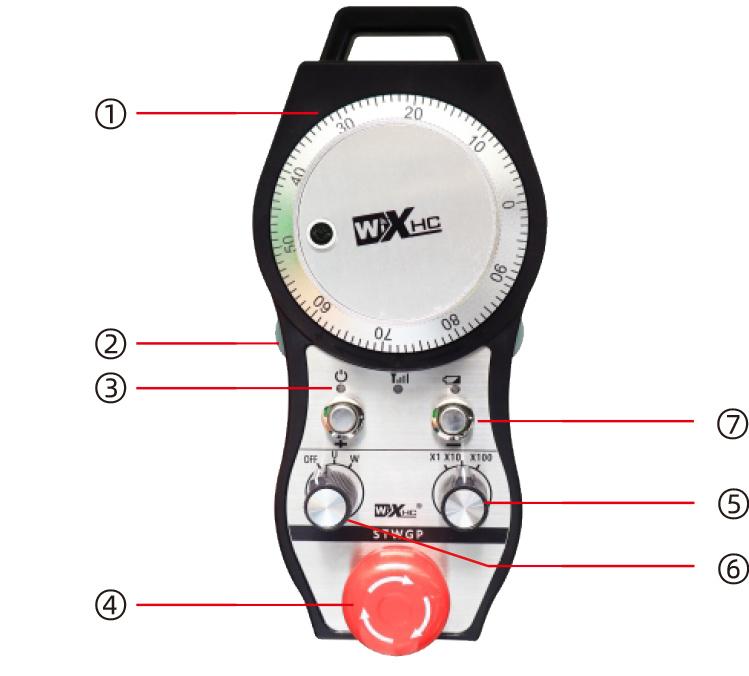
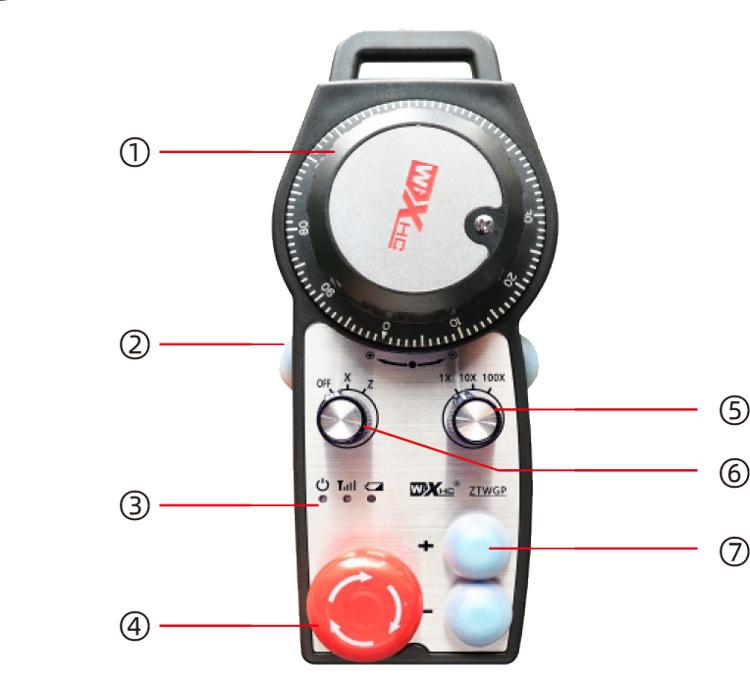
Comment:
①Pulse encoder:
Press and hold the enable button,Shake pulse encoder,Send a pulse signal,Control machine axis movement。
②Enable button:
Press either enable button on both sides,Two sets of enable IO outputs on the receiver are turned on,Release the enable button,Enable IO output disconnection;And when switching the axis selection magnification,and before turning the hand wheel,Need to press and hold the enable button to be effective;This function can be canceled through the configuration software。
③Indicator light:
left light:Power on light,Use the handwheel to select the axis OFF to start the machine.,This light is always on after turning on the machine;
middle light:signal light,When operating any function of the handwheel,This light is on,Does not light up when there is no operation;
Right light:Low voltage warning light,Battery power is too low,This light flashes or stays on,Need to replace battery。
④Emergency stop button:
Press the emergency stop button,Two sets of emergency stop IO outputs on the receiver are disconnected,And all functions of the handwheel are invalid。
Release emergency stop,The emergency stop IO output on the receiver is closed,All functions of the handwheel restored。
⑤Magnification switch:
Press and hold the enable button,Switch magnification switch,The magnification controlled by the handwheel can be switched。
⑥Axis selection switch (power switch):
Press and hold the enable button,Switching the axis selection switch can switch the moving axis controlled by the handwheel.。Switch this switch from OFF to any axis,Handwheel power on。
⑦Custom button:
2custom buttons,Each button corresponds to an IO output point on the receiver。
Product installation steps
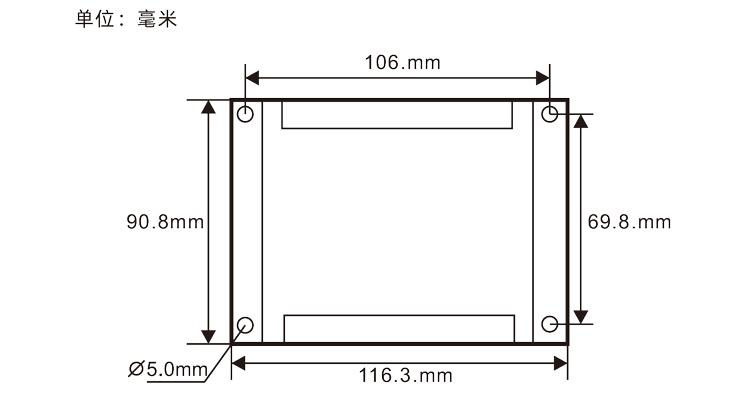
1.Install the receiver into the electrical cabinet through the buckle on the back,Or install it in the electrical cabinet through the screw holes at the four corners of the receiver。
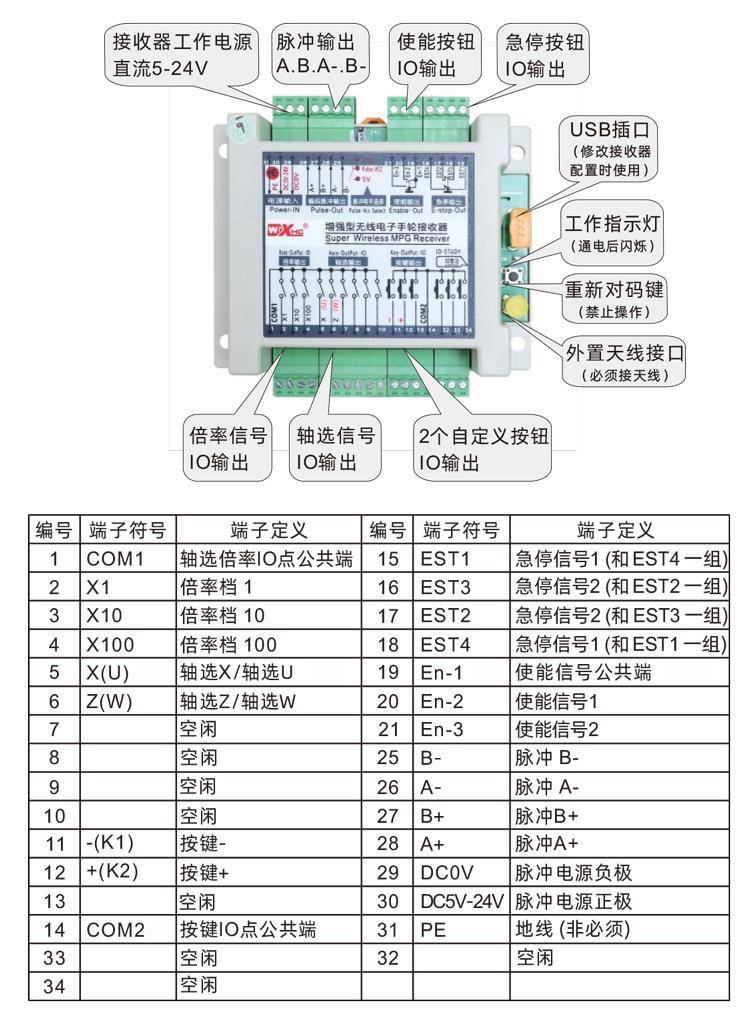
2.Refer to our receiver wiring diagram,Check against your field equipment,Connect the device to the receiver via cable。
3.After the receiver is fixed,The antenna equipped with the receiver must be connected,And install or place the outer end of the antenna outside the electrical cabinet,It is recommended to place it on the top of the electrical cabinet for the best signal effect.,It is prohibited to leave the antenna unconnected,Or place the antenna inside the electrical cabinet,May cause the signal to become unusable。
4.Finally turn on the handwheel power switch,You can operate the hand wheel remote control machine。
Receiver installation dimensions
Receiver wiring reference diagram

1.Machine powered on,Receiver powered on,The receiver working indicator light flashes,Install the battery on the wireless electronic handwheel,Fasten the battery cover,Turn on the wireless electronic handwheel power switch,The hand wheel battery light is on。
2.Select axis:Press and hold the enable button,Toggle axis selection switch,Select the axis you want to operate。
3.Select magnification:Press and hold the enable button,Switch magnification switch,Select the magnification file you need。
4.moving axis:Press and hold the enable button,Select the axis selector switch,Select the magnification switch,Then turn the pulse encoder,Turn clockwise to move the axis forward,Counterclockwise rotation of the negative moving axis。
5.Press and hold any custom button,The IO output of the corresponding button of the receiver is turned on,Release button output turns off。
6.Press the emergency stop button,The receiver disconnects the emergency stop IO output,Handwheel function failure,Release the emergency stop button,Emergency stop IO output is closed,Handwheel function restored。
7.Do not operate the handwheel for a period of time,The handwheel automatically enters sleep standby,Reduce power consumption,when using again,The handwheel can be activated by pressing the enable button。
8.Do not use the handwheel for a long time,It is recommended to switch the handwheel shaft to the OFF position,Turn off handwheel power,Extend battery life。


①:ZTWGP represents appearance style
②:Pulse output parameters:
01:Indicates that the pulse output signal is A、B;Pulse voltage 5V;Number of pulses 100PPR。
02:Indicates that the pulse output signal is A、B;Pulse voltage 12V;Number of pulses 25PPR。
03:Indicates that the pulse output signal is A、B、A-、B-;Pulse voltage 5V;Number of pulses 100PPR。
04:Indicates low level NPN open circuit output,The pulse output signal is A、B;Number of pulses 100PPR。
05:Indicates high level PNP source output,The pulse output signal is A、B;Number of pulses 100PPR。
③:Represents the number of axis selector switches,2Represents 2 axes。
④:Represents the axis selection switch signal type,A represents point-to-point output signal,B represents the encoded output signal。
⑤:Represents the magnification switch signal type,A represents point-to-point output signal,B represents the encoded output signal。
⑥:Represents the number of custom buttons,2Represents 2 custom buttons。
⑦:Represents the system handwheel power supply,05Represents 5V power supply。
⑧:L stands for left column (left tool rest),R stands for right column (right tool rest)。

| Failure situation |
Possible reasons |
Troubleshooting
|
|
Turn OFF switch,
Unable to boot,
The power light does not light up
|
1.Handwheel without battery installed
Or the battery is installed abnormally
2.Battery is low
3.Handwheel failure
|
1.Check the installation of handwheel battery
2.Replacement battery
3.Contact the manufacturer and return to the factory for maintenance
|
|
Handwheel startup,
No response from operation,
During operation,Handwheel signal
The light is off
|
1.Receiver is not powered on
2.The receiver antenna is not installed
3.The distance between the remote control and the machine is too far
4.environmental interference
5.Enable is not pressed during handwheel operation
button
|
1.Check that the receiver is powered on
2.Install the receiver antenna,And install the outer end of the antenna outside the electrical cabinet and fix it
3.Operate at normal distance
4.①Optimize electrical cabinet wiring,Keep the receiver antenna wiring as far away as possible from 220V and above
Try to use an independent switching power supply for the upper line ② receiver power supply.,and
Add power isolation module and magnetic ring to the power cord,Increase anti-interference ability
|
|
Handwheel startup,
Low voltage warning light flashes
|
1.Battery is low
2.Abnormal battery installation or poor contact
|
1.Replacement battery
2.Check battery installation,And whether the metal sheets at both ends of the battery compartment are dry
No foreign matter,clean it
|
|
Hand wheel press button,
or turn the switch,
or shake pulse encoder,
No response
|
1.Switch/Button/Pulse Encoder
Damage fault
2.Receiver damage failure
|
1.Observe turning a switch or pressing a button
Or when shaking the pulse encoder,Is the signal light of the handwheel flashing?,Not bright
Meter switch or button or encoder failure,Return to factory for repair;Light means normal,check
Check whether the receiver wiring is correct
2.Return to factory for repair
|
|
After the receiver is powered on,
No lights on the receiver
|
1.Power supply abnormality
2.Power wiring error
3.Receiver failure
|
1.Check if the power supply has voltage,Does the voltage meet the requirements?
2.Check whether the positive and negative poles of the power supply are connected reversely
3.Return to factory for repair
|

1.Please keep it at normal temperature and pressure,Use in dry environment,Extend service life。
2.Please avoid getting exposed to rain、Use in abnormal environments such as blisters,Extend service life。
3.Please keep the appearance of the handwheel clean,Extend service life。
4.Please avoid squeezing、fall、Bump and wait,Prevent damage to the precision parts inside the handwheel or accuracy errors。
5.Not used for a long time,Please store the handwheel in a clean and safe place。
6.Pay attention to moisture-proof and shock-proof when storing and transporting。
1.Please read the instructions carefully before use,Operation by non-professionals is prohibited。
2.Please replace the battery in time when the battery is too low,Avoid errors caused by insufficient power causing the handwheel to be inoperable。
3.Need repair,Please contact the manufacturer,If the damage is caused by self-repair,The manufacturer will not provide warranty。






-500x650.png)

.png)