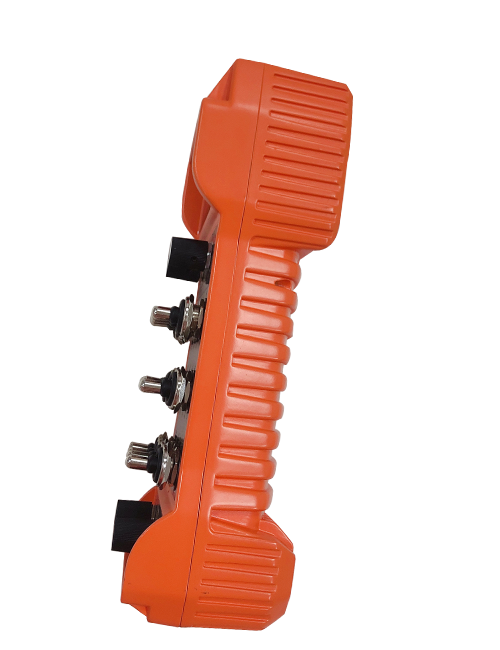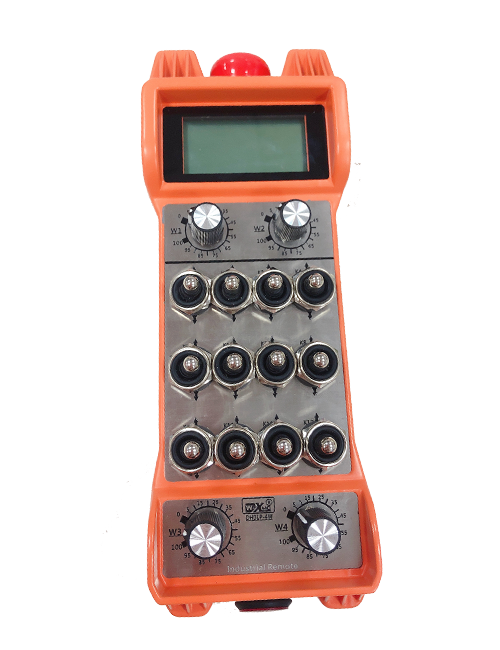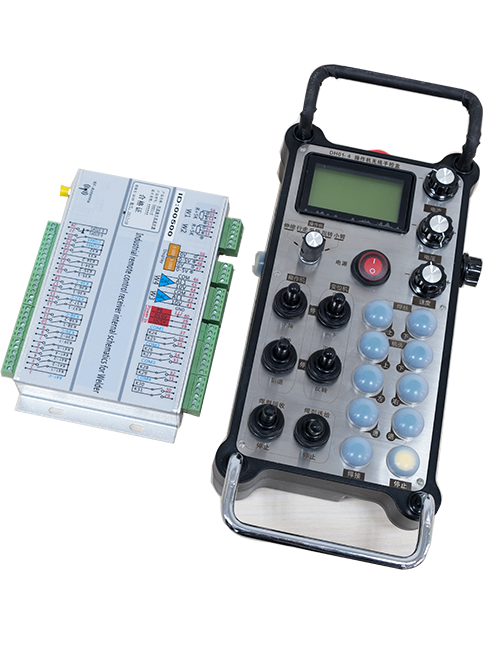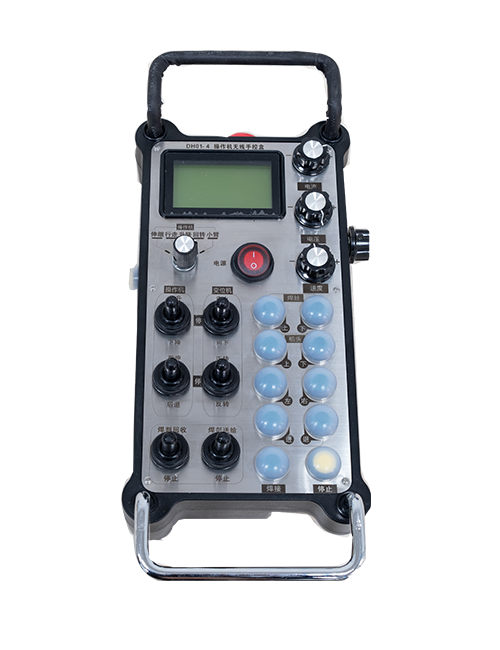

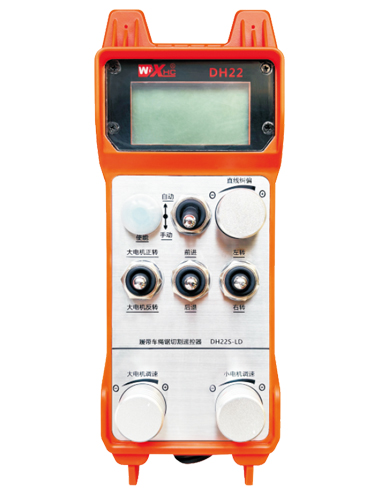
Floor grinder wireless industrial remote control
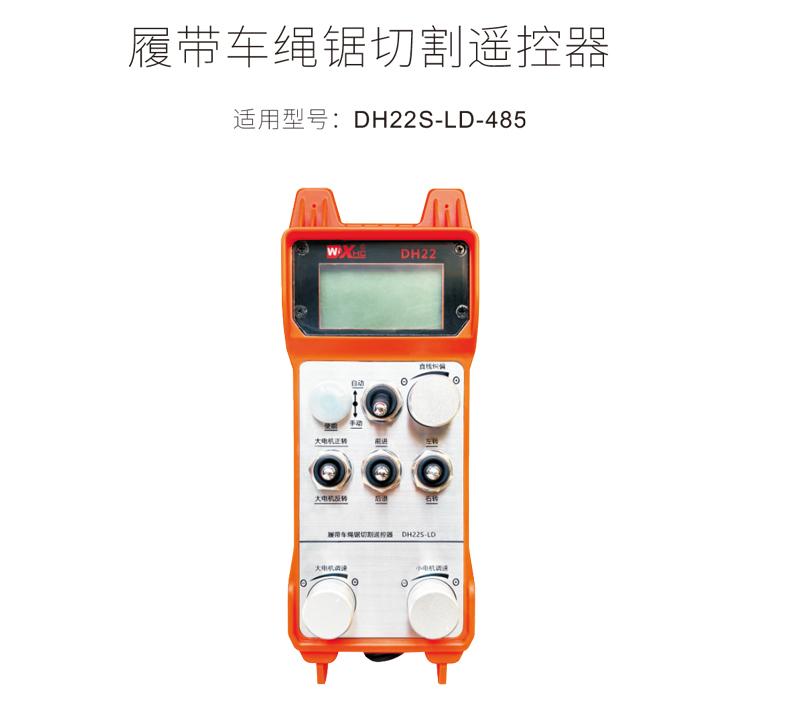
Track car rope saw cutting remote control DH22S-LD-485
Description
1.产品简介
Crawler wire saw automatic cutting remote control is suitable for crawler wire saw cutting machines,采用485Modbus RTU 协议控制左右履带变频器调速启动和前后左右方向控制,以及大电机变频器调速启动。And the working current of the large motor inverter can be read through the 485-Modbus RTU protocol,通过大电机电流的分析对比,Automatically adjust left and right track speeds in real time,Realize automatic cutting function。
2.产品功能特点
1.Using 433MHZ wireless communication technology,Wireless operating distance 100 meters。
2.Adopt automatic frequency hopping function,Use 32 sets of wireless remote controls at the same time,No effect on each other。
3.支持所有带485 modbus RTU协议的变频器,The currently adapted inverter brands include:Shanghai Xielin、Fuji、Huichuan、Zhongchen、INVT、Yasukawa Tatsu。If the brand is not adapted, please contact us for customization.。
4.支持大电机变频器调速、start up、Current reading。
5.Support left and right crawler inverter speed adjustment、start up、Front and rear left and right controls。
6.Support left and right crawler inverter linear correction,Keep the machine moving in a straight line。
7.Support wire saw automatic cutting function,According to the large motor current information,Automatically adjust left and right track speeds in real time。
8.It is also compatible with direct IO output to control motor start and stop.,Analog voltage output controls motor speed。
3.产品规格
| Handheld terminal operating voltage and current | 2节AA电池-3V/10mA |
| 接收器工作电压电流 | 24V/1A |
| Handheld terminal transmit power | 15dBm |
| Receiver receiving sensitivity | -100dBm |
| Wireless communication frequency | 433Mhz频段 |
| working temperature | -25℃<X<55℃ |
| Anti-fall height | Comply with national testing standards |
| Waterproof level | IP67 |
| 产品尺寸 | 225*84*58(mm) |
4.产品功能介绍
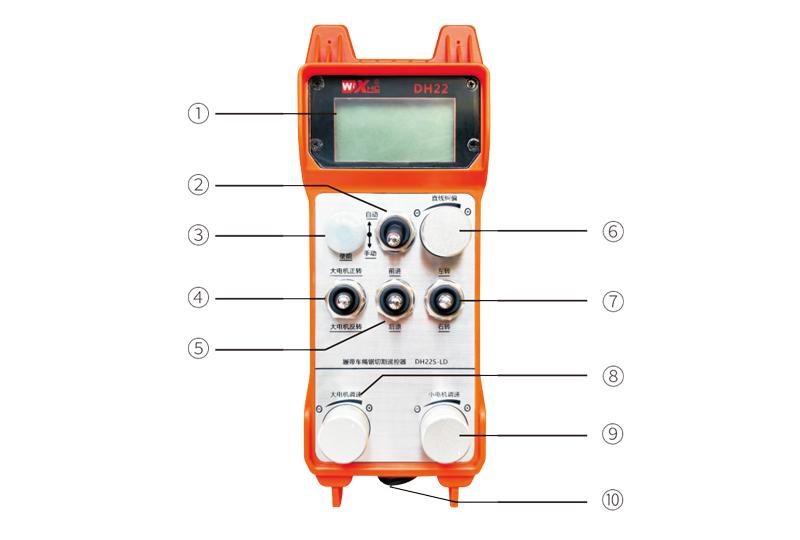
Comment:
①Screen display:
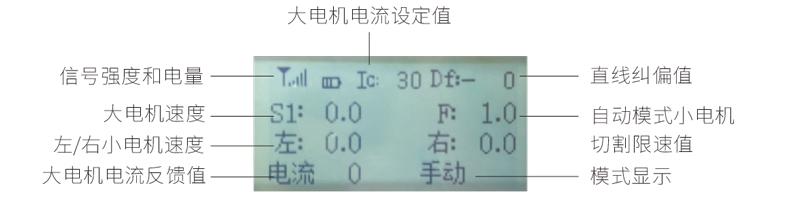
②Mode switch:
Adopt 2-speed switch,Can switch between automatic and manual modes,显示屏上会有对应模式显示切换。
③使能:
Combination button,Some operations require pressing and holding the enable button to operate,See the description of each switch for details.。
④Large motor switch:
Adopt 3-speed reset switch,flip this switch,Can control forward and reverse rotation of large motors,松手后状态会保持,There will be a corresponding display on the display,S1↑箭头表示正转,S1↓箭头表示反转。
⑤Small motor forward/reverse switch:
Adopt 3-speed self-locking switch,按下使能按钮+扳动此开关,Can control the small motor to move forward and backward,There will be a corresponding display on the display,↑↑箭头表示前进,↓↓箭头表示后退。
⑥直线纠偏:
Using multi-turn encoder knob,Press enable button,Turn knob right,Straight line correction display:Df:left,Each turn of the knob increases by 1 unit.,左电机速度增加0.1个单位;Turn knob left,Straight line correction display:Df:right,Each turn of the knob increases by 1 unit.,右电机速度增加0.1个单位。
⑦Small motor turning switch:
Adopt 3-speed reset switch,Turn this switch in manual mode,Can control small motor to turn left and right,松手后遥控器会自动停止此动作。In forward state,flip this switch,There will be a corresponding display on the display,←↑箭头表示左转,↑→箭头表示右转。In retreat state,flip this switch,There will be a corresponding display on the display,←↓箭头表示左转,↓→箭头表示右转。
⑧Speed regulation of large motor:
Using multi-turn encoder knob,每次转动1格,The large motor speed value changes by approximately 0.2 units,Rapid rotation can quickly modify the large motor speed value。
⑨Small motor speed regulation:
Using multi-turn encoder knob,In manual mode,Press enable button,Then rotate 1 frame each time,左右小电机速度值变化大约0.1个单位,Quick rotation can quickly modify the speed value of the small motor。In automatic mode,Press enable button,Then rotate 1 frame each time,The small motor speed limit value F changes by about 0.1 unit,Quick rotation can quickly modify the speed limit value of small motors。
⑩遥控器电源开关:
遥控器显示屏开机。
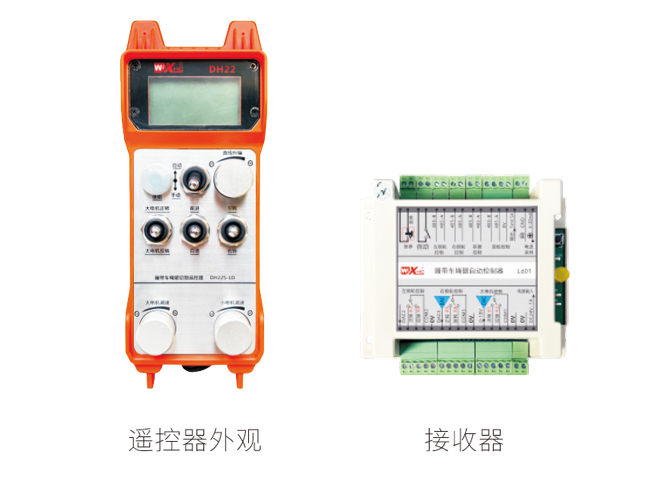
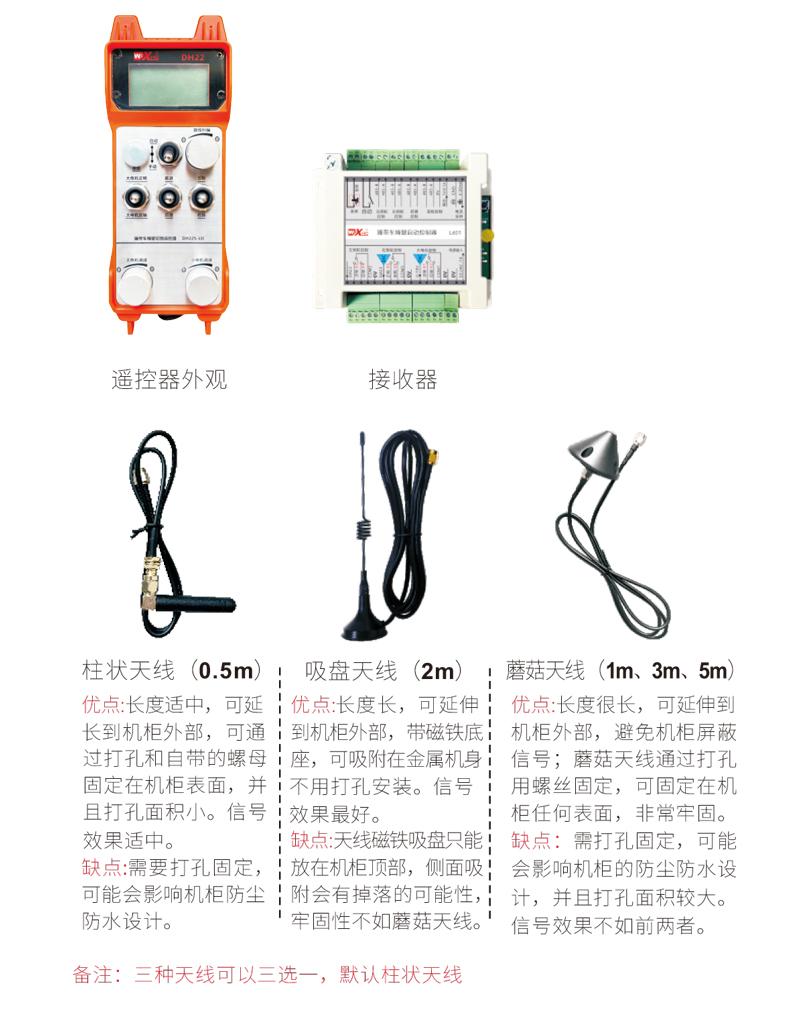
5.产品配件图
6.产品安装指南
6.1Product installation steps
6.1Product installation steps
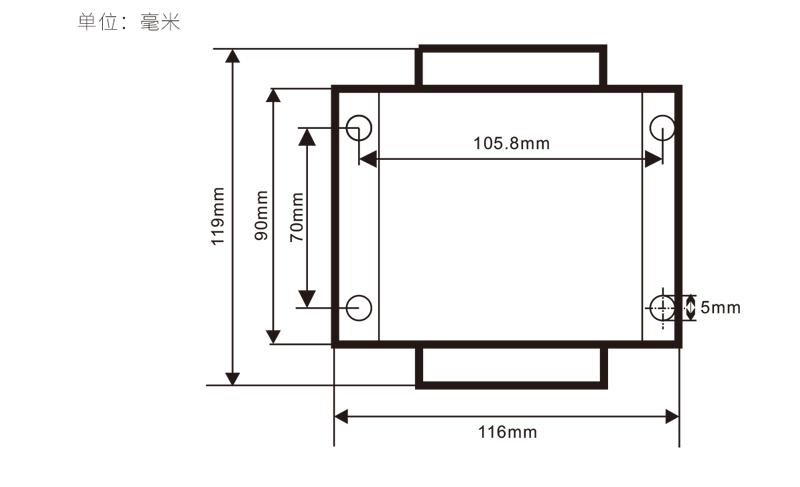
1.Install the receiver into the electrical cabinet through the buckle on the back,Or install it in the electrical cabinet through the screw holes at the four corners of the receiver。
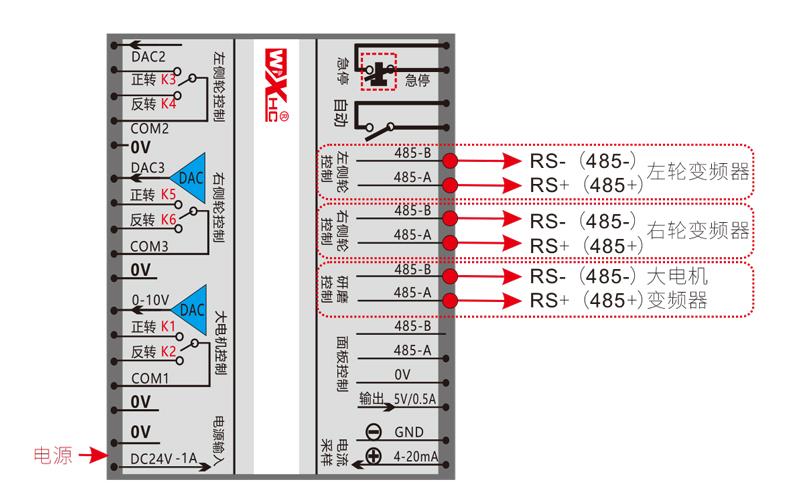
2.Refer to our receiver wiring diagram,Check against your field equipment,将设备通过导线和接收器连接。
3.After the receiver is fixed,The antenna equipped with the receiver must be connected,And install or place the outer end of the antenna outside the electrical cabinet,It is recommended to place it on the top of the electrical cabinet for the best signal effect.,It is prohibited to leave the antenna unconnected,或者将
天线放在电柜内部,May cause the signal to become unusable。
4.Finally, install the batteries in the remote control,Tighten the battery cover,Then turn on the remote control power switch,遥控器显示屏会显示正常工作界面后,You can perform remote control operation。
6.2Receiver installation dimensions
6.3Receiver wiring reference diagram
7.产品操作说明
7.1Remote control parameter settings
Enter the remote control background parameter method:Move the mode switch to manual mode,小电机速度调到左右都是25,或者都是0、10、20、40、50,Pull the forward rotation switch of the large motor upward 3 times in a row,Pull down 3 times in succession;
使用“小电机调速”旋钮翻页,After pressing enable, turn the small motor speed control knob to modify the parameters.;
修改完之后,Turn the page to the end,Select Save and Exit,Press the enable button to exit the menu;
The parameters are as follows:
最大电流:Large motor current feedback value range,Setting range 15-200A,默认100;
调速参数:Automatic mode small motor automatically accelerates speed,The smaller, the faster,Setting range 200-1500,默认800;
减速参数:Set the upper limit for allowed motor speed changes,When the current change exceeds this value,will slow down。
The smaller,The left and right motors decelerate faster,Range 05-12,Default 06;
加速度a1:The larger the motor, the faster the speed increases.,Range 00-06,Default 01;
减速度a2:The larger the motor speed is, the faster it will decrease.,Range 00-06,Default 02;
Enable speed adjustment:Is it necessary to press Enable to adjust the speed of small motors?,00Disable,01enable,Default 01;
Start self-locking:Will the large motor automatically maintain self-locking after the forward and reverse switch is released?,00do not maintain,01保持,Default 01;
最大行走:Maximum speed of left and right motors,Range 10-100,Default 50;
Cutting current:Maximum cutting current,The screen displays the IC value,Range 15-160,Default 30,屏幕对应显示IC:30。The upper limit of this parameter = maximum current x80%;
默认限速:The default small motor automatic cutting speed at startup,Range 00-100,Default 10,屏幕对应显示F1.0,This parameter is only accurate when the maximum walk is set to 50。
自动模式:设为00,自动/手动开关是模式切换,设为01,自动/手动开关打到自动档位,显示屏显示照明,接收器上自动端子输出闭合,打到手动,自动输出端子断开;
speed limit offset:Small motor automatic cutting speed upper limit,Range 00-200,Default 60,屏幕对应显示6.0;Display value upper limit = speed limit offset × 0.1;
最大主机:Maximum speed of large motor,Range 10-100,Default 50;
mbus device (required):Large motor inverter model selection,Range 00-03,Default 03;
00-Shanghai Xielin 01-Fuji
02-英威腾 03-汇川(众辰、Robin Kang)
sbus device (required):Small motor inverter model selection,Range 00-05,Default 03;
00-Shanghai Xielin 01-Fuji
02-英威腾 03-汇川(众辰、Robin Kang)
04-安川 达 05-暂无
7.2Frequency converter parameter setting
1.Command source selection:Communication command channel
2.Main frequency source selection:communication given
3.baud rate:19200
4.Data format:No checksum,Data format<8-N-1>
5.Local address:Left frequency converter is set to 1,The right frequency converter is set to 2,Large motor inverter is set to 3
7.3Remote control operating instructions
1.Machine powered on,Remote control power on,Enter the remote control background,Set the background parameters of the remote control,主要
是设置小电机和大电机变频器型号(机器厂家已设置的跳过这一步);
2.Set the inverter parameters (skip this step if the machine manufacturer has set them);
3.Switch the remote control to manual mode,Then use the remote control to move the machine to the working position;
4.In manual mode,Set the large motor cutting current setting value IC,Set the maximum motor speed;
5.Switch to automatic mode,Set the small motor cutting speed limit F value;
6.In automatic mode,Turn the big motor switch to forward to start the big motor,然后将小电机开关扳到
前进或后退档,The remote control enters automatic cutting mode,Start cutting。
8.产品故障排除
| Failure situation | Possible reasons |
Troubleshooting
|
|
按电源开关,
Unable to turn on and off,
显示屏不亮
|
1.遥控器未安装电池
或电池方向安装错误
2.Battery is low
3.Remote control failure
|
1.Check the battery installation status of the remote control
2.Replacement battery
3.Contact the manufacturer and return to the factory for maintenance
|
|
Remote control power on,
显示掉网急停!
请重新操作!
|
1.Receiver is not powered on
2.The receiver antenna is not installed
3.The distance between the remote control and the machine is too far
4.environmental interference
5.遥控器开机前,必须接收器先通电,遥控器再开机
|
1.Check that the receiver is powered on
2.Install the receiver antenna,And install the outer end of the antenna outside the electrical cabinet and fix it
3.Operate at normal distance
4.①Optimize electrical cabinet wiring,接收器天线走线尽量远离220V及以上线路②接收器电源尽量使用独立开关电源供电,并且电源线增加电源隔离模块和磁环,Increase anti-interference ability
|
|
Remote control power on,显示chage battery
|
1.Battery is low
2.Abnormal battery installation or poor contact
|
1.Replacement battery
2.Check battery installation,以及电池仓内两端金属片是否干净无异物,clean it
|
|
遥控器某些按钮
或开关无反应
|
1.开关损坏故障
2.Receiver damage failure
|
1.观察扳动开关时,显示屏是否有对应箭头显示;有箭头显示,代表开关正常;无箭头显示代表开关已坏,Return to factory for repair
2.Return to factory for repair
|
|
After the receiver is powered on,No lights on the receiver
|
1.Power supply abnormality
2.Power wiring error
3.Receiver failure
|
1.Check if the power supply has voltage,Does the voltage meet the requirements?
2.Check whether the positive and negative poles of the power supply are connected reversely
3.Return to factory for repair
|
9.维护与保养
1.Please keep it at normal temperature and pressure,Use in dry environment,Extend service life。
2.Please avoid getting exposed to rain、Use in abnormal environments such as blisters,Extend service life。
3.Please keep the battery compartment and metal shrapnel area clean。
4.Please avoid squeezing and dropping the remote control, which may cause damage.。
5.Not used for a long time,Please remove the battery,And store the remote control and batteries in a clean and safe place。
6.Pay attention to moisture-proof and shock-proof when storing and transporting。
10.安全信息
1.Please read the instructions carefully before use,Operation by non-professionals is prohibited。
2.Please replace the battery in time when the battery is too low,Avoid errors caused by insufficient battery power causing the remote control to be inoperable.。
4.Need repair,Please contact the manufacturer,If the damage is caused by self-repair,The manufacturer will not provide warranty。